
Last updated: August 2026
Below is a detailed description of all Juristat services, features, and add-ons which are sold within Juristat Order Forms governed by the Juristat Master Service Agreement.
Juristat Analytics
General Description:
Prosecution Analytics allows users to query Juristat’s database of USPTO patent applications and view the results of their query as (a) a textual list of applications, (b) a customizable exportable table where each row is an application and each column is one of 100+ different data points that can be added or removed, a (c) a customizable exportable dashboard of charts and graphs that depict data points (such as allowance rate, office action rate, extensions, filings, etc.) for entities (such as firm, assignee, examiner, art unit, etc.) grouped by various methods (such as by entity, over time, etc.). Users can save searches, set alerts on individual applications, upload their own custom list of applications. Further, Prosecution Analytics provides a user interface from which to view an individual application’s data including office actions, claim text, specifications, drawings, and additional data.
Feature Description:
Examiner and Art Unit Reports
An Examiner Report is an interactive tool that helps attorneys and agents predict examiner behavior. These reports provide actionable insights that help practitioners impress clients, partners, and examiners themselves, including examiner allowance rate, number of OAs to allowance, total OAs issued per year, the statistical likelihood of issuing an NOA after an interview, RCE, or appeal, as well as keyword searching of every OA issued by the examiner. The Art Unit report shows much of the same data but for the Art Unit to which the Examiner is assigned.
Intelligence View
Delivers a set of charts and graphs based on the user’s query and filters. Filters include but are not limited to app number, filing date, rejection basis, assignee, firm, and status. Query subjects include but are not limited to assignee, firm, examiners, attorneys, tech centers, art units, CPC classes, app numbers, patent numbers and keywords found within application documents or office actions.
Table View
Delivers a sortable table of data based on the user’s query and filters. Filters include but are not limited to app number, filing date, rejection basis, assignee, firm, and status. Query subjects include but are not limited to assignee, firm, examiners, attorneys, tech centers, art units, CPC classes, app numbers, patent numbers and keywords found within application documents or office actions.
Standard Dashboards
A series of dashboards that surface important data and insights to users. Included in Growth, Premier, and Enterprise tiers. These include:
-
Practice Overview (firms) — A firm-wide summary of prosecution activity across tech centers, art units, examiners, and attorneys.
-
Portfolio Overview (corporates) — A portfolio-level summary of prosecution performance across examiners, art units, and application status.
-
Prosecution Strategy — Surfaces examiner and art unit behavioral data to guide prosecution decisions, including interview vs. amendment, RCE vs. appeal, and client expectation-setting.
-
Competitive Intelligence — Tracks competitor patent activity, filing trends, and prosecution performance within the user's technology space.
-
Premium Benchmarks — Compares a user's prosecution performance against industry peers across allowance rates, pendency, OA rates, and other key metrics.
Premium Dashboards
A series of dashboards that surface important data and insights to users. Included in Premier and Enterprise tiers. These include:
-
Outside Counsel Scorecard (corporates) — Benchmarks outside counsel performance on allowance rates, costs, pendency, and response quality.
-
Maintenance Fees — Surfaces patents approaching maintenance fee deadlines and provides analytics to support pruning and renewal decisions.
Basic Training and Onboarding
Our team of dedicated Account Managers and Customer Success Managers will walk you and your team through comprehensive, bespoke training for the Juristat services you have purchased.
Support
Basic Support: Email and ticketing
Provides access to email support where our average response time is one business day, and our public support FAQ articles. Included in all tiers, including Solo.
Premium Support: In-app chat
Provides access to Juristat’s in-app chat tool, where our full-time employee, dedicated, human support staff average <60 second response times, and you will never get stuck talking to offshore contractors reading a script or useless AI chatbots. Included in all tiers, including Solo.
Dedicated CSM time
Juristat’s Customer Success Managers will meet with you monthly for one (1) hour to work on custom reporting, (2) help customize your Juristat instance, (3) provide additional support and platform training, (4) run virtual on-sites focused on anything from business development to firm strategy, and (5) any other similar projects. Included in Enterprise tier.
Exports
Export Table View search results to Microsoft Excel or any other database tool. Limited to 10,000 rows at a time.
Claims Analyzer
Uses artificial intelligence and machine learning to generate claim language analysis to reverse engineer the USPTOs classification system. It takes yet-to-be-filed claim text as input and generates a prediction of the technology centers, art units, and classes where a user’s application will be classified. Further, it has an intuitive system to aid users in making changes to their claim text to help avoid problem areas of the PTO.
Appeals Module
Exposes Ex Parte Appeal statistics to showcase PTAB and Pre-Decision Outcomes. Users can filter PTAB data to benchmark chances of success with appeals by CPC Class, Tech Center, rejection basis, and more. Users can also view examiner-specific statistics for reversals, reversals-in-part, and affirmances.
Citation Insights
(Previously named Citations Module) Allows users to track forward and backward citations for any assignee. This data examines 102 and 103 rejections data to help users understand which competitors they are blocking, which applications are blocking their own patents, find licensing opportunities, and identify emerging competitors. Likewise, users can determine which patents are most valuable and should be maintained.
Business Development Module (firms only)
Designed for firm users who want to grow their book of business using data. Includes an expansion opportunities table that lists current firm clients where there is opportunity for growth. An opportunity detail view showcases the business development profile for a select assignee, including current firm relationships, patent filing trends, and performance metrics.
Private Patent Center
When a user sponsors Juristat via Patent Center’s sponsorship system it allows the user to generate analytics on their non-published patent applications. Further, it keeps a user’s data up-to-date with multiple daily pulls from Patent Center. The user’s non-published data is securely stored in a single-tenant location accessible only to the user and user’s dedicated Juristat support team.
SSO
Enables users to log in to multiple applications and websites with one set of credentials increasing cyber security and reducing the need for users to store multiple user names and passwords. Juristat supports SSO with multiple providers including Google, Microsoft, or any identity provider that uses SAML.
Custom Dashboards
Juristat will build customized dashboards for the Customer. This work will be scoped, and Juristat will dedicate up to 15 hours of data engineering and development time to build these dashboards. Additional bundles of hours can be purchased separately.
Import Custom Metadata
Juristat will ingest data provided by the customer into the Juristat application to be accessible directly in the software. Data will be provided by the customer in the form of a CSV.
Portfolio Cost Analytics
Provides enterprise users with cost modeling and forecasting tools for managing total prosecution spend across a portfolio. Surfaces cost data by firm, examiner, art unit, tech center, and application status to support budgeting, outside counsel negotiations, and portfolio prioritization decisions.
Juristat AI Summaries
Juristat AI Summaries are AI-generated plain-language summaries of patent application data, built on Juristat’s prosecution data. They help practitioners and IP teams get up to speed on a case, an office action, or an invention without reading the full file wrapper.
Custom Integrations
Connects Juristat directly to the customer's other systems and a negotiated Service Level Agreement governing uptime, response times, and committment's. Contact your Account Manager for supported platforms and integration requirements.
API (Sold Separately)
Provides secure access to a REST API that allows users seamless, bulk access to the documents and metadata contained within their USPTO Private Patent Center instance. A user's data is constantly updated as the USPTO releases new information, and the API allows you to query everything updated since a user's last download. Using this tool, law firms and in-house users can combine Juristat's data with other data sources they purchase in their own data visualization dashboards or patent management environment.
Juristat Office Action Response (OAR)
General Description:
Juristat Office Action Response (OAR) is purchased separately from Juristat Analytics.
Juristat OAR makes responding to office actions easy. Upon an OAR-triggering event, we deliver a single digital packet with all the necessary documentation and background information you need to craft a response. An OAR-triggering event is defined as an non-final rejection, final rejection, restriction requirement, or ex-parte Quayle action.
Feature Description:
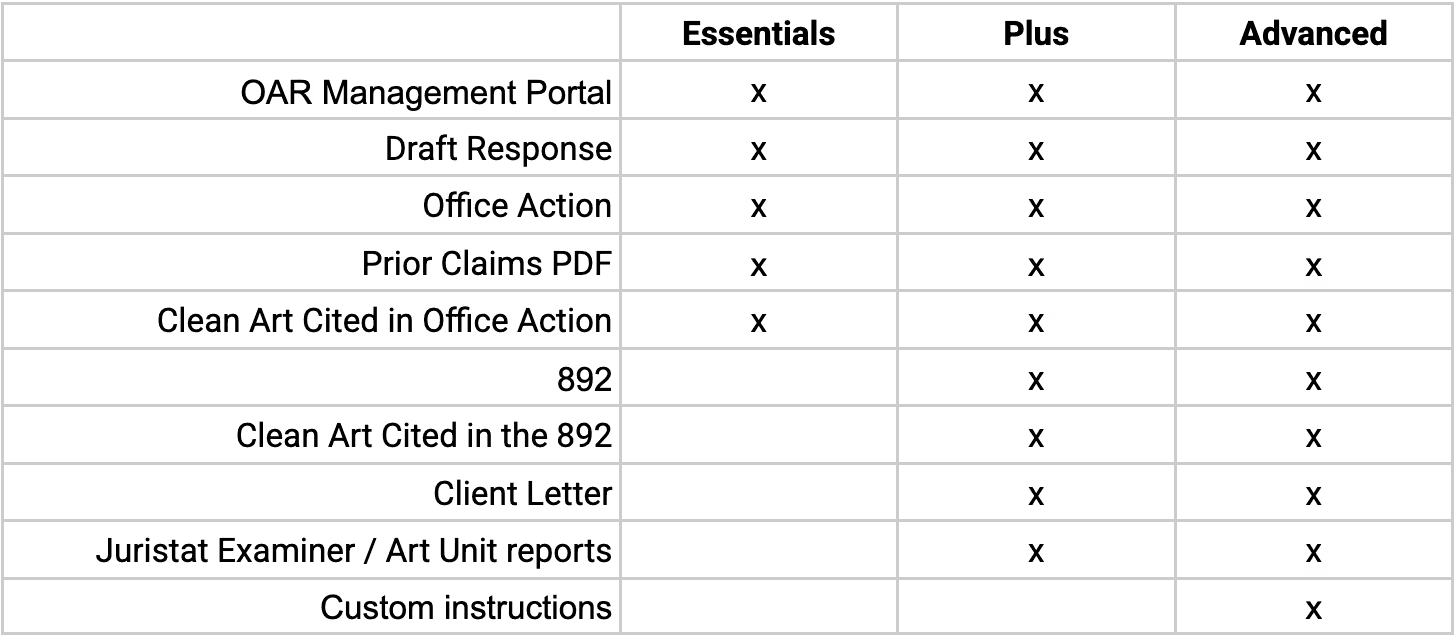
OAR Management Portal
Allows you a secure SaaS interface for checking the status of a user’s OAR projects being completed by Juristat and links to re-download them, if needed.
Draft Response
The Draft Response (aka “shell”) is the core of the OAR deliverable. Juristat will automatically template the Draft Response based on the user’s preferences with the ability to use different templates based on Client Matter Number, Attorney Registration number, and Rejection type. Further, the document’s caption, headers, footers, and signature block will all be updated as needed.
Juristat will clean up all claim language amendments and update all claims tags, as well as provide an outlined Remarks section with each rejection basis cited by the examiner.
Office Action
A PDF copy of the Office Action issued by the examiner.
Prior Claims PDF
A PDF copy of the most recent CLM doc filed with the PTO.
892
A PDF copy of the 892 doc filed by the Examiner in the current OA.
Clean Art Cited in Office Action
A PDF copy of all prior art cited by an examiner in the body text of their rejection.
Clean Art Cited in the 892
A PDF copy of all prior art listed by the Examiner in the 892 but not cited by an examiner in the body text of their rejection.
Client Letter
Juristat’s Client Letters serve to inform the user’s client that the OA has occurred, and the bases for the rejection. Juristat will automatically template the Client based on the user’s preferences with the ability to use different templates based on Client Matter Number, Attorney Registration number, and Rejection type. Further, the document’s headers, footers, and signature block will all be updated as needed. Most OAR subscribers forward these letters to their in-house counsel with zero changes or review.
Juristat Examiner/Art Unit reports
A PDF copy of Juristat’s Analytics reports on the Examiner and the Art Unit issuing the rejection. Users utilize these reports to optimize prosecution strategy to appeal v RCE, interview v. merely amend, and to manage client expectations before difficult examiners with low allowance rates or high OA rates. This is included at no additional cost to existing Juristat Analytics subscribers, no matter their OAR service tier.
Custom Instructions
Customer Instructions include any other feature requests from users not listed above, including but not limited to: including a PDF copy of the 1449 doc, Publication doc, DRW doc or SPEC doc; basic or premium claim charting, custom folder naming instructions for the OAR folder and its subfolders, Interview Agenda template, annotated art cited in Office Action, and more.
OAR Services Tiers
Juristat IDS
General Description:
Juristat IDS is purchased separately from Juristat Analytics.
Juristat IDS automates the preparation and e-filing of IDS forms. Each time a disclosure-triggering event occurs, Juristat IDS instantly traverses the patent family tree, identifies active cases, determines what prior art has already been cited, and delivers ready-to-file IDS documents directly to a user. Disclosure-triggering events are defined as US domestic Office Actions, Foreign Office Actions, PCT Search Reports and Supplemental Search reports, as well as new case filings.
Feature Description:
SB-08
Complete versions of all USPTO SB-08 forms (other than the Certification Statement) that the customer needs to file based on the disclosure trigger. Juristat will traverse an entire patent family tree, determine the active patent family members, and generate completed IDS for listing all new prior art that has not yet been cited in the application.
Cited Art
PDF versions of non-patent literature and foreign references (and US equivalents or machine translations as requested by the user) cited in the document(s) triggering IDS creation, where available. Note that Juristat does not guarantee that it will be able to provide copies of all non-patent literature or foreign patent references.
Reference Chart
Juristat will provide a reference chart to Subscriber indicating the extent of the active family, what was cited in the SB-08 forms prepared by Juristat, and what was not cited because it had previously been cited or a citation was not necessary due to USPTO rules.
Onboarding
Onboarding is a one-time fee for client setup including dedicated time with the user’s CSM to set up IDS rules around translations, subject matter relationships, how to treat child applications, formatting, USPTO Patent Center sponsorship, provision of a secure single-tenant database, and all training. Further, Juristat’s software will generate SB-08s for all currently active applications, in which a reference was previously missed by your prior IDS provider.
Transfer-In Audits
For an additional fee, Juristat may perform transfer-in audits upon user’s request. An audit is defined as when the user asks Juristat to check references other than those included in a single triggering event or a one-month bundled set of triggering events.
Bundling
Juristat may provide users with bunded IDSs for an additional fee. Bundling is done on a calendar monthly basis. At the end of each month, Juristat will file a single IDS per pending patent application as needed based on all the triggering events that occurred in that calendar month.
E-filing
All available cited art that is required to be filed by USPTO rules will be uploaded into Patent Center by Juristat. To complete the E-Filing process Subscriber merely needs to execute the Certificate Statement on all provided SB-08 forms, upload them into Patent Center, and then complete the E-filing process.
PATENT CENTER ERASES ALL UPLOADED BUT UNFILED DATA AFTER TWO WEEKS. IF SUBSCRIBER MISSES THIS DEADLINE IT CAN REUPLOAD THE NECESSARY DOCUMENTS MANUALLY FREE OF CHARGE, OR IT CAN REQUEST JURISTAT REUPLOAD THE DOCUMENTS, IN WHICH CASE A $100 CONVENIENCE FEE WILL BE CHARGED.
AI & Workflow
Juristat OA Strategy Brief
General Description:
Juristat OA Strategy Brief is an AI-generated prosecution strategy document produced in response to a USPTO Office Action. The brief leverages Juristat's full data stack, including examiner behavioral analytics, prosecution history, comparable application outcomes, and prior art analysis, to give practitioners a data-driven strategic recommendation before drafting their response. OA Strategy Briefs are available as an add-on to Juristat Analytics or OAR.
Feature Description:
Recommendation & Action Plan
A front-loaded, plain-language recommendation on the optimal prosecution path, whether to request an examiner interview, amend claims, file an RCE, or appeal, supported by examiner-specific and art unit statistics.
Examiner Behavioral Intelligence
A summary of the issuing examiner's historical prosecution behavior, including allowance rate, average OAs to allowance, interview success rate, RCE outcomes, and appeal reversal and affirmance rates.
Invention & Prior Art Summary
An AI-generated summary of the invention as claimed and the prior art cited in the Office Action, provided to orient the practitioner and establish a baseline for the response strategy.
Identified Examiner Errors
A review of the rejection for potential legal or procedural errors, including improper claim construction, failure to establish a prima facie case, and other issues, for attorney review and consideration.
Comparable Application Lessons
A review of similar applications prosecuted before the same examiner or within the same art unit, highlighting prosecution strategies that resulted in allowance.
Prosecution Viability Assessment
A data-driven assessment of the application's prosecution viability, including a recommendation for continuation or abandonment when the data supports such a conclusion.
Claim-by-Claim Rejection Mapping
An appendix mapping each examiner rejection to the relevant claim(s) and rejection basis (e.g., §101, §102, §103, §112), providing a structured reference for drafting the response.
Juristat Data Layer
General Description:
Juristat Data Layer is Juristat's Model Context Protocol (MCP) server, which exposes Juristat's prosecution intelligence data and AI capabilities to MCP-compatible AI tools and agents. The Data Layer allows users to query USPTO application data, retrieve examiner and art unit reports, access prosecution analytics, run agents, and more, directly from an AI environment both inside and outside the Juristat web application.
Connections to the Juristat Data Layer are authenticated and governed by the same permissions and Data Layer Credit allotments as the user's Juristat Analytics subscription. Actions taken through the Data Layer consume Credits at the same rate as equivalent in-app actions.
Feature Description:
Available Data Layer Capabilities
-
Application lookup and document retrieval
-
Examiner and Art Unit report generation
-
Office Action data, metrics, and rejection analysis
-
Appeals data and PTAB statistics
-
Application search and list filtering
-
Agent execution
Data Layer Credits
General Description:
Data Layer Credits are Juristat's unit of consumption for AI-powered features available in both the Juristat web application and the Juristat Data Layer (MCP). Credits are consumed when users make tool calls, record calls, or run agent workflows. Credits are consumed at the same rate regardless of subscription plan or customer type.
Credits are allocated annually and vary by subscription tier. Users can monitor their Credit balance within the application or by request. Additional Credits can be purchased in packs as an add-on. Unused Credits do not roll over between billing periods. Credits are non-transferable between users on single-seat plans unless otherwise specified in the Order Form.
Pre-Built Agents / Prompts
General Description:
Pre-Built Agents (Prompts) are AI-powered autonomous workflows that perform multi-step research and analysis tasks on behalf of the user. They can be invoked from within the Juristat application or triggered via the Juristat Data Layer. Each agent call consumes Data Layer Credits. Pre-Built Agents are included in all Juristat Analytics subscription tiers that include MCP, including Solo. Specific agents available under a given subscription are identified in the applicable Order Form.
Custom Agents
General Description:
Custom Agents are bespoke AI-powered workflows built to address a customer's specific operational needs. Juristat will scope and develop Custom Agents in collaboration with the customer's team. Custom Agents are available in the Enterprise tier only. Customers interested in Custom Agents should contact their Account Manager or Customer Success Manager to initiate a scoping discussion.